
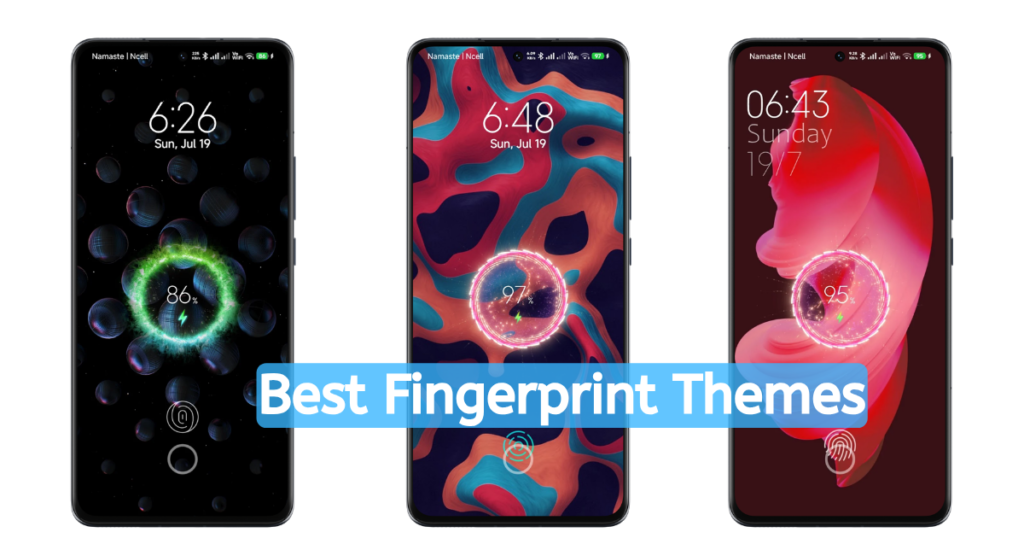
Xiaomi, Redmi ও POCO ফোনে লকস্ক্রিনে সুন্দর fingerprint animation ও charging animation চান? এই সাইটে বাংলাদেশের ব্যবহারকারীদের জন্য জনপ্রিয় Android MI Themes Fingerprint Lock থিমগুলো এক জায়গায় পাবেন — যেমন Ronix, RealX Legacy, OriginFTW, New Oxy Era। বেশিরভাগ থিম অফিসিয়াল Xiaomi Theme Store থেকে ডাউনলোড করা যায়। Realme Legacy এখন স্টোরে নেই — শুধু MTZ ফাইল হিসেবে পাওয়া যায়। ইনস্টল করতে MTZ ইনস্টল গাইড দেখুন।
These Android MI Themes Fingerprint Lock themes change the appearance of supported Xiaomi, Redmi and POCO phones. A fingerprint symbol or animation is a visual effect: it cannot add a fingerprint sensor, move a side-mounted sensor into the screen, or replace the phone’s existing PIN, pattern, password or biometric security. Check the selected theme’s support on your device before applying it.
I’m Bijay. I use a Redmi Note 14 5G Global running HyperOS 3 and have personally tested the Xiaomi themes shared here, including Ronix and RealX Legacy. This is my reported testing experience; the exact firmware build, test dates and individual theme-version results have not been recorded. Check the version and designer shown for each theme and confirm compatibility on your own device.
Before going, let me clear you all that all the themes that are shared on this site are owned by different designers, I am not the owner and developer of these premium Xiaomi HyperOS Themes. I aim to share that I like to redesign and give a better experience in your Redmi Phone with these MIUI Themes.
Primary Features of these Android MI Themes Fingerprint Lock
Although all these themes are based on and prepared under Xiaomi’s Default Theme, we can’t expect significant changes in it. But still, there are a lot of customized experiences, designs, and skins that make it a good choice for customization lovers like me. Here are the major features of these themes,
Fingerprint Animation: As said earlier, all these themes feature a premium and exciting fingerprint experience. This fingerprint animation (not the in-built fingerprint) looks premium and also smooth like your phone’s in-built features. The animation is decorative; unlock the phone using its existing supported authentication methods.
Changes in App Icons: Every fingerprint theme mentioned here has its own User Interface; due to this, the app icons look different from your phone’s default app icons and also different from one theme to another. So, with these new premium app icons, you will get a better experience. Like in the New Oxy Era, you will get app icons similar to OnePlus phone and Realme Legacy for Realme Phone’s app icons.
Minor Changes in Lockscreen and Homescreen: You can also notice the minor changes from one theme to another, as compared to your built-in design. Here too, the minor changes like changes in Lockscreen clock widget, Homescreen widgets, Wallpapers, etc.
Charging Animation: The major highlights of these themes are that it also features the beautiful charging Animation. Yes, different than your default charging animation, you will get a better, unique, and customized charging animation that actively works while plugged in to charge your phone.
Best Free Android MI Themes Fingerprint Lock for your Xiaomi Phones (Xiaomi, Redmi, and POCO)
After reading a few details about the key features of these fingerprint theme locks, I hope you get an idea of whether to go with these themes or not. So, if you are planning to go with these themes and waiting to read the theme-wise features to use them right now to explore the new experience on your phone, then here you are. Now, let’s dive into every MIUI Theme that features the Fingerprint experience.
Ronix Theme with Fingerprint & Charging Animation
Ronix MIUI Theme is one of the most searched themes in Bangladesh and India. It’s the super premium fingerprint theme that features all the complete features mentioned above. Here you will get a premium Homescreen layout with the beautiful clock widget and new UI. Also, the Lockscreen and the click widget of the lock screen with the beautiful minimal wallpaper make it one of the Best HyperOS Themes in the Xiaomi Themes World.
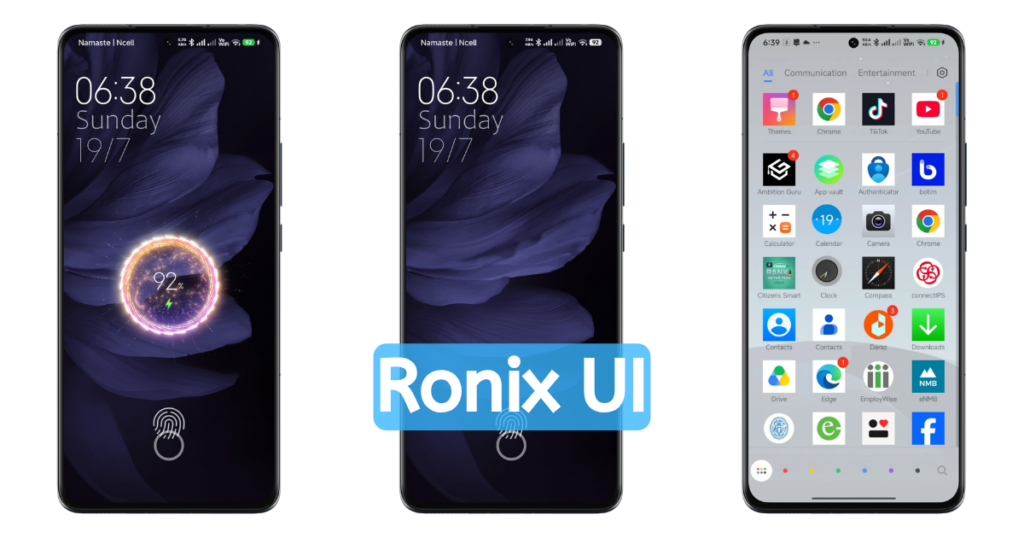
Ronix changes the appearance of system icons such as Wi-Fi, mobile data and battery. Performance and compatibility depend on the device and software build. Also, the app icons in this Ronix Fingerprint Theme are inspired by the RealmeUI of Realme phones, so the users who also want to get the RealmeUI Experience, including all the above features, can definitely try this beautiful Android MI Themes Fingerprint lock.
Besides all these, here you will find the proper option to switch/select the fingerprint animation and charging animation experience. Yes, from the theme settings, you can easily change the Animation style of the fingerprint and also for the Charging.

realX Legacy Fingerprint Theme with realmeUI Experience
RealX Legacy MIUI Theme is another premium fingerprint theme that features all the above features. Here, as in Ronix Android MI Themes Fingerprint Lock, you will get a beautiful lock screen featuring the new, redesigned clock widget with minimal wallpaper. Also, in Homescreen, we can find the beautiful clock widget with minor changes in the Homescreen layout. Also, the app icons are dark and minimal, which is inspired by the RealmeUI.
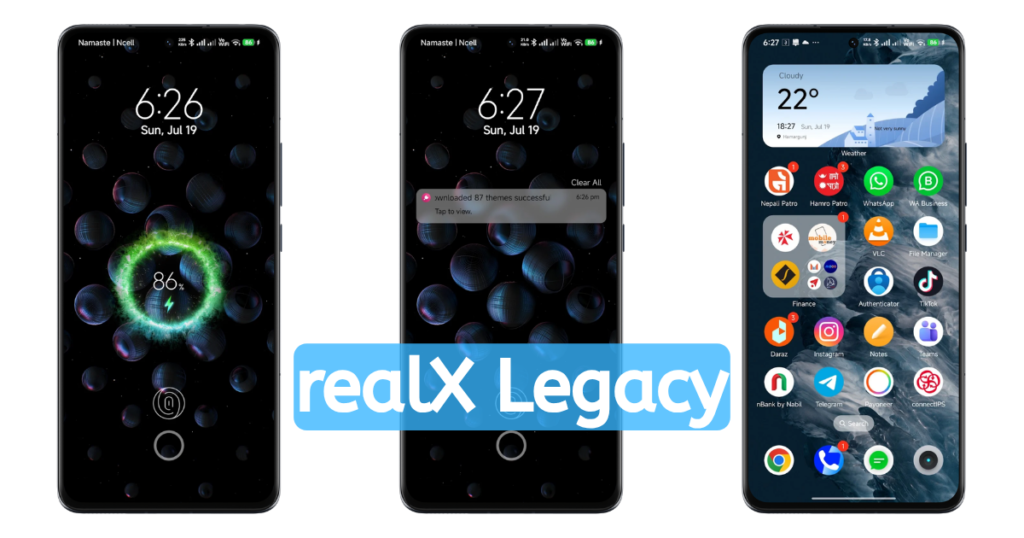
After applying this theme, you can also notice the minor changes in the system Settings page, including the changes in the icons like Wi-Fi, Mobile Data, Battery, etc. So, if you want to explore the better changes and new UI Experience in your Xiaomi Phone, then you can apply this theme now.
Besides these, you can also find the beautiful Minimal Charging Animation that works perfectly while your phone is plugged in and charging. Besides, you can also set the charging animation layout with different options from the theme settings. At last, the Fingerprint Animation works perfectly and looks really premium as compared to the Ronix HyperOS Theme.
OriginFTW Android MI Themes Fingerprint Lock
If you love the MaterialUI Experience, then you can definitely go with this most beautiful and premium theme, OriginFTW. OriginFTW is one of the best MI Fingerprint Themes that features a completely customized experience, which is required to be the best MIUI Themes at all.
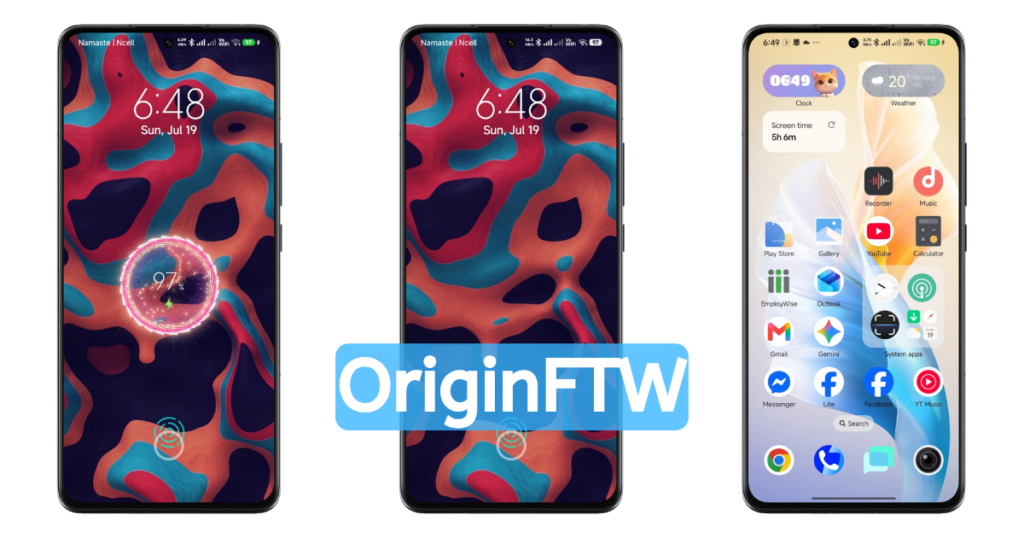
Starting with the Lockscreen here, you will get a MaterialUI Experience minimal design wallpaper with the support of a new and customizable clock widget. Also, in Homescreen, there’s the beautiful clock widget and redesigned App icons, and full support for a lot of app widgets to give a better experience to your Homescreen.
Besides these, you can also notice major changes in the System settings, including the system icons like Wi-Fi, Mobile Data, Battery, etc. After applying this theme, you will get a totally different and never-before-seen user experience that perfectly makes it one of the best and premium themes.
At last, like other Themes here too, you can find the beautiful charging animation that works perfectly while the phone is plugged in. Also, the Fingerprint Animation can be customized from the Themes Settings easily to turn on/off or change it.
New Oxy Era Theme with OxygenOS Experience
OxygenOS by OnePlus used to be one of the best Custom Android skins at a time. Still, it’s one of the good custom skins made for the Android OS. So, if you want to get the premium Fingerprint and Charging Animation, including the OxygenOS Experience, then this theme is only for you. Yes, for a specific custom skin lover like you, it’s one of the perfect Android MI Themes Fingerprint Lock that I shared for you.
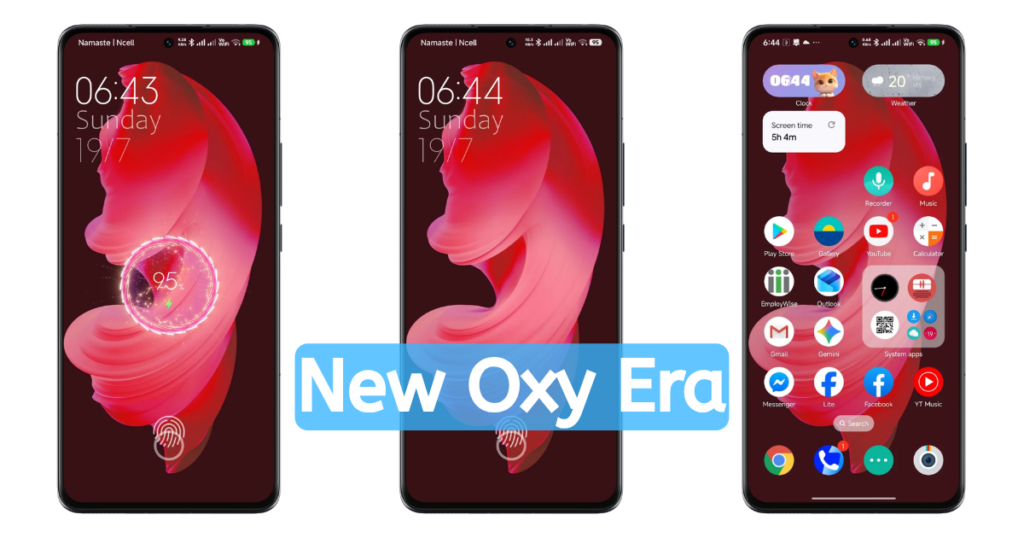
Like other themes here, too, you will find minor changes in the lockscreen. The lockscreen of this theme features the default old design, OnePlus red minimal wallpaper, with the classic minimal clock widget. Also, in Homescreen, it features a similar wallpaper that can be changed as per your needs easily. But in Homescreen, you will get a premium OnePlus app icon, which is really awesome and premium too.
Besides these, we can notice minor changes in the System app icons, similar to other Fingerprint Themes. With all these, you can find the premium Charging Animation that adds a premium design experience to your Xiaomi phones. At last, here you will get a Fingerprint Animation to unlock the phone (that swipes up your phone to unlock it).
Realme Legacy Fingerprint Theme with RealmeUI Experience
If you love the Minimal Orange Experience like RealmeUI, then this theme may be the best Android theme with a fingerprint lock that you can apply right now. As with other premium themes, here too you can find similar changes, customization experience, and other minor changes in system settings.
Either it’s the lockscreen or Homescreen, including other minor changes over the System settings and icons like Wi-Fi, Battery, Mobile Data, Time, etc. Also, the app icons are different and look modern, which is inspired by and similar to the Realme Phones.
Also, the Fingerprint experience is better and looks premium, which makes it one of the Best Fingerprint Themes for Redmi and Xiaomi phones. Likewise, the charging animation that we are mentioning in every theme is also available here. So it’s another best Android MI Themes Fingerprint Lock. Currently, it’s only availiable in MTZ Files.
Choosing the Right Fingerprint Themes for your Xiaomi Phones (MIUI & HyperOS)
As I already mentioned earlier, you can try every theme mentioned here, time by time, to keep on exploring the UI of every theme to get rid of boredom due to the same experience. I recommend the RealX Legacy Theme because it is lightweight and premium in User Interface compared to others, which makes it a perfect and balanced theme in every aspect, like in Optimization, Customization, and Pre-customized User Interface.
Besides these, I recommend you try all themes every week to keep exploring new experiences and avoid boredom with using the same design.
Process to Install and Apply the Fingerprint Themes in your Xiaomi MIUI & HyperOS
Step 1: Downloading the Required Xiaomi MIUI Theme
So, at first, you have to decide which theme you want to apply. For that, you have to download that particular theme. If you are on the homepage or on this page (this current page), then follow these steps,
- Tap on a particular theme Heading (Name: like RealX Legacy), it will redirect you to the detail page of that theme (RealX Legacy or any as per your selection),
- Scroll down from that page and find the download links (All the links are shared from the official Xiaomi Theme store),
- Tap on Official Store Download, it will directly redirect you to a particular theme page on Xiaomi Theme Store app,
- Now tap on Download, and it will start downloading the file.
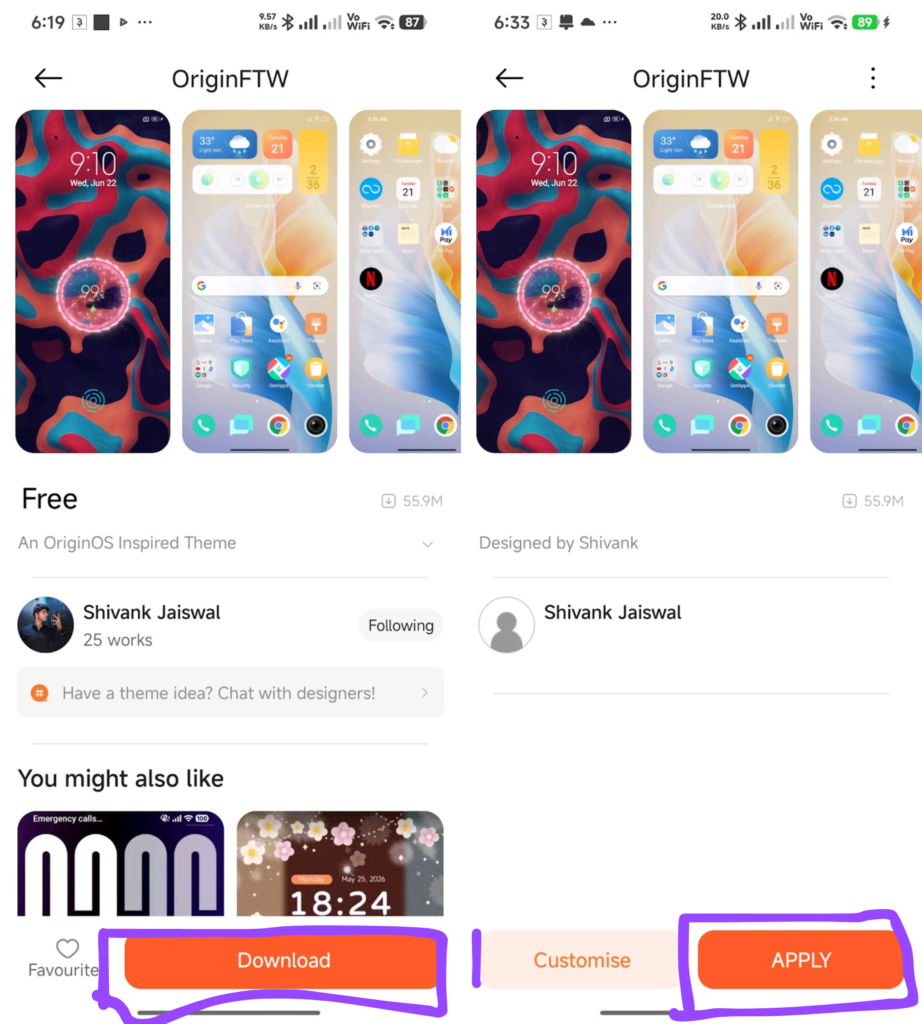
Step 2: Applying the Theme
- After successful download, tap on APPLY,
- That’s all,
Note: Make sure that under Customise, near APPLY, all the Advanced Customization options are enabled.
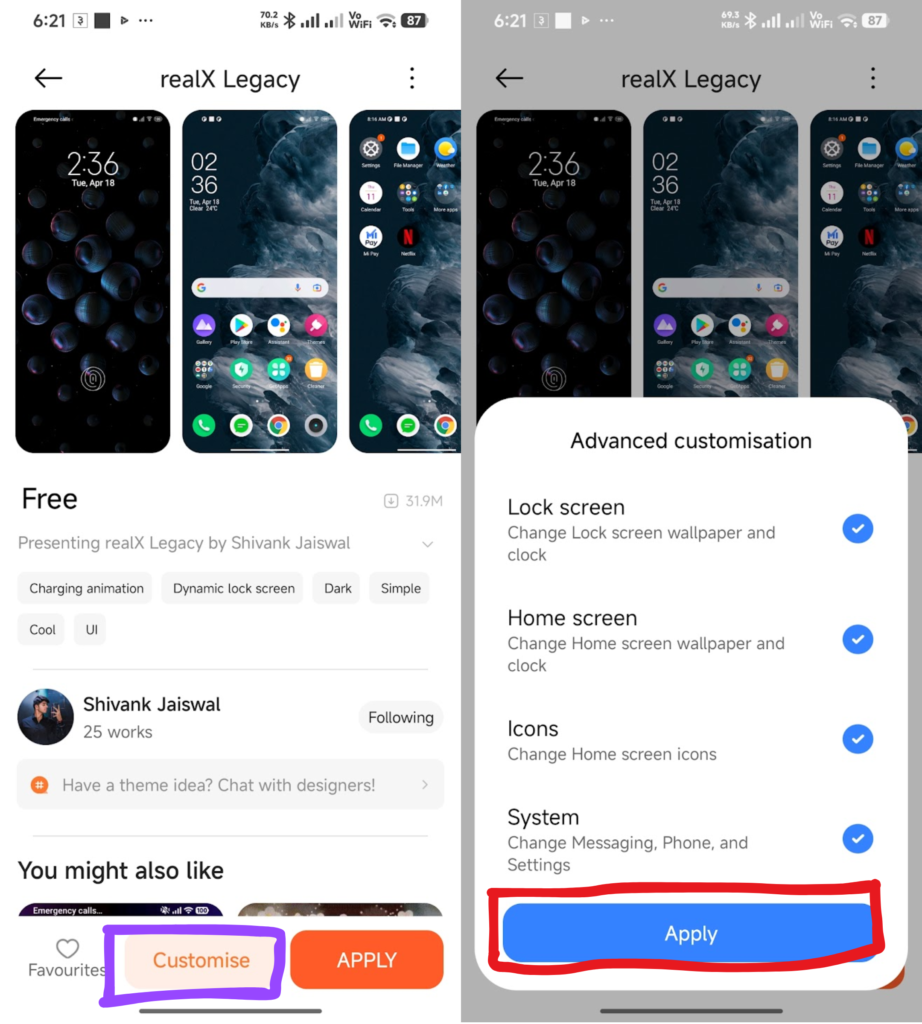
Unable to Download the Theme? Try this method
Sometimes (Xiaomi’s internal reason), if you are using external browsers like Google Chrome, Microsoft Edge, Firefox, or any other browser other than MI Browser, then your phone blocks access to that redirection from that Link to Xiaomi’s Theme App. So in that case, you can follow these simple steps,
- Copy the URL (Link) of that page,
- Open your MI Browser and paste that link, and then go or type Enter,
- You will be successfully redirected to the Xiaomi Theme Store App,
- That’s all, and start downloading.
FAQs
How can I customize a fingerprint theme?
Open the selected theme’s lock-screen customization options if they are available. Menu names and animation controls vary by theme, device and MIUI/HyperOS build. A theme effect is separate from the phone’s biometric unlocking settings.
How can I check fingerprint animation options on HyperOS?
Apply the theme’s lock-screen component, then check any customization controls offered by that lock style. Not every theme animation works on every HyperOS build. Keep the phone’s normal screen-lock and fingerprint settings configured.
Are these fingerprint themes safe?
Use Xiaomi’s official Themes app when the intended theme is available, and verify its name and designer before applying it. Realme Legacy is linked here as an MTZ-only download. An external file’s name does not establish its authenticity, safety or compatibility; an official listing also does not guarantee every effect works on your device.
Conclusion
That’s all about the best Android MI Themes Fingerprint Lock to customize and give the best user experience in your Xiaomi Phones. Here, I have shared all the premium and best fingerprint themes that are publicly available in the official Xiaomi Themes app store. I hope you will love this best recommendation shared with you to give a better fingerprint and charging experience in your existing Xiaomi, Redmi, and POCO Phones.